Publishing newspapers online has become an essential strategy for modern publishers, local newspapers, magazines, and media organizations. While PDF remains one of the most common formats for preparing a newspaper edition, simply uploading a PDF file to a website may not provide the best reading experience.
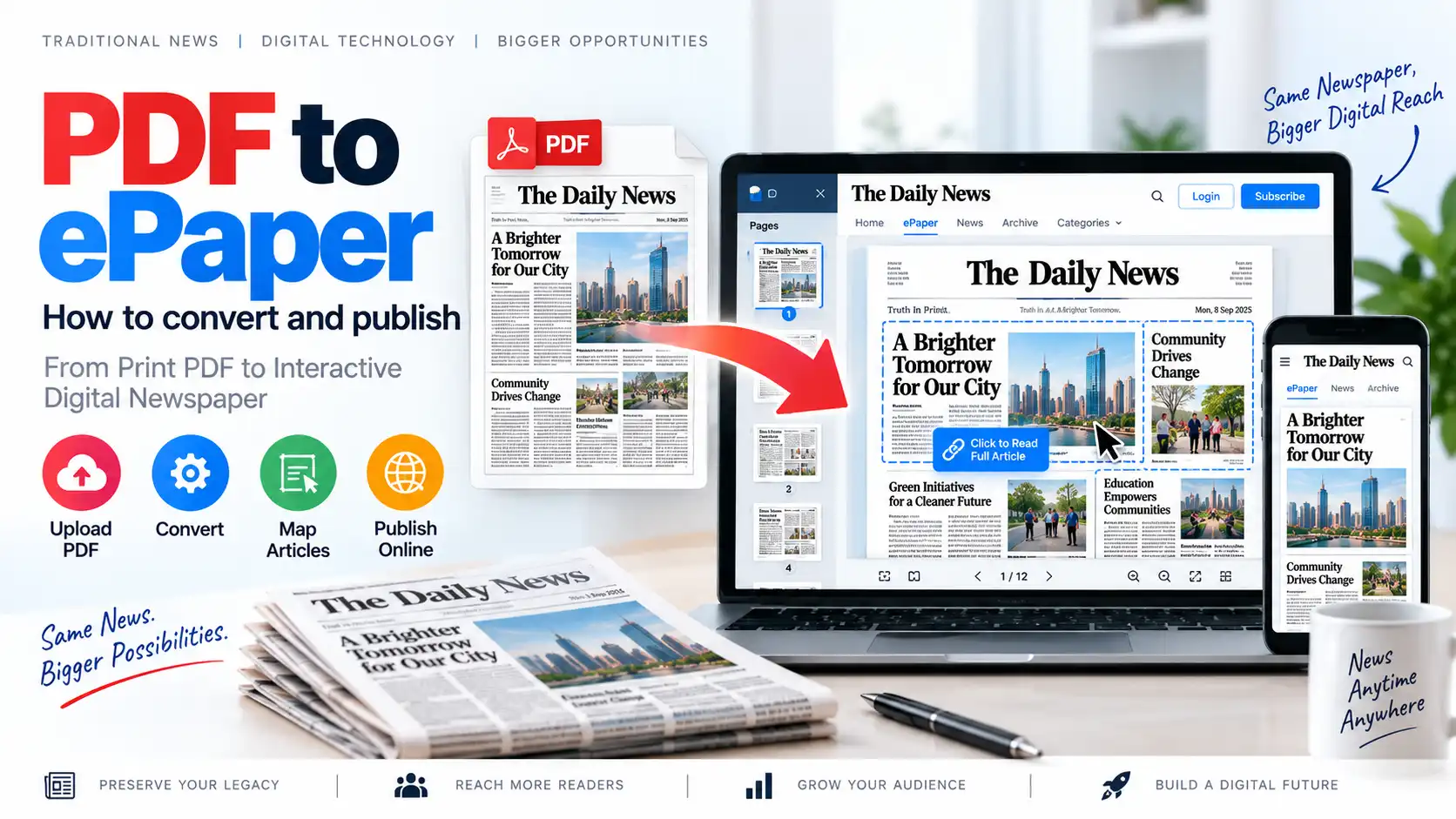
A PDF to ePaper solution converts a traditional newspaper PDF into a digital edition that readers can access through desktop computers, tablets, and smartphones. With the right ePaper publishing software, publishers can add article mapping, searchable archives, subscriptions, online payments, social sharing, notifications, and mobile-friendly access.
This guide explains how to convert PDF newspapers into interactive digital ePaper editions and publish them online.
What Is PDF to ePaper?
PDF to ePaper is the process of converting a newspaper PDF into an online digital newspaper edition.
A standard PDF generally works as a downloadable or viewable document. An ePaper edition, however, can provide a more structured and interactive reading experience. Depending on the software, readers may be able to:
- Read the newspaper page by page
- Zoom in and out
- Search for articles
- Open individual articles
- Share news stories
- Access previous editions
- Read newspapers on mobile devices
- Subscribe to digital editions
- Continue reading articles across multiple pages
A PDF to ePaper platform helps publishers transform their existing newspaper production workflow into a digital publishing system.
Why Should Newspapers Convert PDF Editions Into ePaper?
Many newspapers already prepare their daily editions using desktop publishing and design software. Their final output is usually a PDF file. Converting that PDF into an ePaper allows publishers to reuse the same content for digital distribution.
1. Publish Newspapers Faster
Publishers can upload the final PDF after the print edition is prepared. This reduces the time required to create a separate digital edition from scratch.
2. Reach Readers Beyond Print Distribution
A digital newspaper can reach readers in different cities, states, countries, and international markets. Readers do not need to wait for physical delivery.
3. Improve Mobile Accessibility
A mobile-friendly ePaper allows readers to access the newspaper through smartphones and tablets. This is especially useful for regional and local newspapers.
4. Create a Digital Newspaper Archive
Older editions can be stored in an organized archive. Readers can browse newspapers by date, edition, language, category, or publication.
5. Generate Digital Revenue
Publishers can offer free or paid access through:
- Monthly subscriptions
- Annual subscriptions
- Single-edition purchases
- Membership plans
- Premium articles
- Sponsored content
- Digital advertising
6. Increase Article Discoverability
When PDF pages are combined with article-level content and SEO-friendly URLs, individual news stories can become easier to discover through search engines.
PDF Newspaper vs Interactive ePaper
A PDF file and an interactive ePaper are related, but they are not exactly the same.
| PDF Newspaper | Interactive ePaper |
|---|---|
| Usually viewed as a document | Designed for digital newspaper reading |
| May require downloading | Can be accessed directly online |
| Mostly page-based | Can include page and article-level navigation |
| Limited search capabilities | May support article and edition search |
| Sharing is often file-based | Individual articles can be shared |
| May not be mobile-optimized | Can support responsive and PWA-based access |
| Usually lacks subscription tools | Can include subscriptions and payments |
| Archive management is often manual | Can provide structured digital archives |
A PDF can be the starting point, while an ePaper CMS can add the digital publishing features needed for a modern newspaper website.
For a broader introduction, publishers can read What Is ePaper CMS? Complete Guide for Newspaper Publishers.
How to Convert PDF to ePaper: Step-by-Step Process
The conversion process depends on the ePaper software being used. However, most professional workflows follow a similar structure.
Step 1: Prepare the Newspaper PDF
Before uploading the file, make sure the PDF is complete and ready for publication.
Check the following points:
- All newspaper pages are included
- Pages are arranged in the correct order
- Text and images are readable
- The PDF is not corrupted
- Page dimensions are consistent
- The file size is optimized
- Advertisements and graphics are correctly positioned
- The edition date is accurate
- The newspaper name and edition are correct
A high-quality PDF produces a better reading experience after publication.
Recommended PDF Preparation Practices
Publishers should avoid uploading extremely large files unnecessarily. Large PDFs can increase loading time, especially for mobile users.
Useful preparation practices include:
- Compressing oversized images
- Removing unused elements
- Using suitable image resolution
- Checking fonts and embedded content
- Keeping page orientation consistent
- Verifying the final PDF on multiple devices
The original print-quality file should be preserved separately, while a web-optimized version can be used for online publishing.
Step 2: Choose PDF to ePaper Software
The next step is selecting an ePaper publishing platform that supports PDF uploads and digital edition management.
When evaluating software, consider the following features:
- PDF-to-ePaper publishing
- Edition management
- Article mapping
- Digital archives
- Mobile-friendly reading
- Search functionality
- Subscription management
- Online payment integration
- Custom domain support
- SEO tools
- User and role management
- Notifications
- Analytics
- Data security
- Backup and recovery
A basic PDF viewer may be sufficient for simple document sharing, but a professional newspaper publisher usually needs a complete ePaper CMS.
You can compare important selection criteria in Best ePaper Software for Newspapers: Features, Benefits and How to Choose.
Step 3: Create a Newspaper Edition
After logging into the ePaper CMS, create a new edition.
Typical edition fields may include:
- Newspaper name
- Edition title
- Publication date
- Edition language
- City or regional edition
- Category
- Cover image
- Description
- Visibility status
- Publication schedule
For example, a publisher may create editions such as:
- National Edition
- Delhi Edition
- Bihar Edition
- Business Edition
- Sunday Special
- Weekly Magazine
- Festival Supplement
Edition management helps publishers organize multiple newspapers and regional publications from one platform.
Step 4: Upload the PDF File
Once the edition is created, upload the prepared newspaper PDF.
The publishing system may process the PDF by:
- Reading the uploaded file
- Detecting the number of pages
- Generating page previews
- Creating a digital edition
- Preparing the file for online viewing
- Connecting the PDF with the selected edition
The processing time depends on the PDF size, number of pages, server resources, and software architecture.
After processing, the administrator should preview every page before publishing it publicly.
Step 5: Verify Page Order and Quality
A newspaper may contain dozens of pages. A single missing or incorrectly ordered page can affect the reader experience.
Before publishing, verify:
- The cover page appears first
- All pages are available
- Page numbers are correct
- Images are not distorted
- Text is readable
- No pages are duplicated
- Advertisements appear correctly
- The PDF opens properly on mobile devices
It is useful to review the edition on:
- Desktop computers
- Android smartphones
- iPhones
- Tablets
- Different web browsers
- Slow internet connections
Step 6: Add Edition Information and Metadata
Every digital edition should have accurate metadata.
Important metadata fields include:
- Edition title
- Publication date
- Newspaper name
- Language
- Region
- Edition description
- Cover image
- SEO title
- SEO description
- Canonical URL
- Social sharing image
For example:
Edition Title: Daily Regional Newspaper – Patna Edition
Publication Date: 14 September 2026
Language: Hindi
Region: Patna
Description: Read the latest local, national, business, and sports news in the digital edition.
Accurate metadata helps readers understand the edition and improves the overall organization of the newspaper website.
Step 7: Add ePaper Article Mapping
One of the most useful features of a modern ePaper platform is article mapping.
Article mapping allows the publisher to select a specific area of a PDF page and connect it to an individual article page.
For example, a newspaper page may contain:
- A headline
- A photograph
- A short article summary
- A continuation reference
- A page number
With article mapping, the selected area can become clickable. When readers click the article, they can open a dedicated article page containing:
- Article title
- Full article text
- Featured image
- Author information
- Publication date
- Related stories
- Social sharing buttons
- SEO metadata
This improves usability and makes individual newspaper stories easier to share and index.
Read more about this process in ePaper Article Mapping: How to Turn PDF Newspapers Into Interactive Digital Editions.
Step 8: Configure Article Continuation
Newspaper stories frequently continue on another page. For example:
Read more on Page 7
An effective ePaper system should allow publishers to connect the first part of an article with its continuation.
The system may support:
- Linking the first article area to the continuation
- Displaying a “Continue Reading” button
- Connecting multiple article sections
- Opening the complete article on a separate page
- Showing the original newspaper page reference
This helps readers navigate long stories without manually searching through multiple pages.
Step 9: Publish the Digital Edition
After completing the review process, the administrator can publish the edition.
Before making it public, verify:
- Publication date
- Edition name
- PDF file
- Page order
- Article links
- Access permissions
- Subscription rules
- SEO metadata
- Mobile display
- Social sharing previews
The edition may be published immediately or scheduled for a particular time, depending on the platform.
A professional workflow should also support draft, review, scheduled, published, and archived statuses.
Step 10: Create a Digital Newspaper Archive
A digital archive allows readers to access older editions.
A useful archive system may include filters such as:
- Date
- Month
- Year
- Edition
- Language
- Region
- Newspaper title
- Publication category
For example, a reader may want to find the newspaper edition published on a specific date several months earlier.
A well-organized archive improves reader retention and gives the newspaper a valuable long-term digital record.
Publishers planning their complete digital website can also review How to Create an Online Newspaper Website From PDF.
Step 11: Make the ePaper Mobile-Friendly
Many readers access digital newspapers through smartphones. Therefore, mobile compatibility should be a major priority.
A mobile-friendly ePaper should provide:
- Responsive page viewing
- Fast loading
- Touch-friendly navigation
- Zoom controls
- Easy page switching
- Readable text
- Mobile article pages
- Simple login and subscription forms
- Optimized images
- Low-bandwidth support
Some ePaper platforms also provide Progressive Web App support. A PWA can allow readers to access the newspaper through an app-like experience without requiring a traditional app-store installation.
Step 12: Add Search and Navigation Features
Readers should be able to find editions and articles easily.
Useful navigation features include:
- Search by edition
- Search by date
- Search by article title
- Search by category
- Search by author
- Previous and next edition buttons
- Page thumbnails
- Table of contents
- Related articles
- Popular stories
Article-level navigation is especially useful when a newspaper contains many pages and multiple regional sections.
Step 13: Configure Subscriptions and Payments
Publishers can use digital subscriptions to create recurring revenue.
Possible subscription models include:
Free Access
Readers can access all editions without payment. Revenue may come from advertisements, sponsorships, or other business models.
Freemium Access
Some pages or articles are free, while premium content requires a subscription.
Monthly Subscription
Readers pay every month to access selected editions or the complete newspaper archive.
Annual Subscription
Readers pay once for access throughout the year.
Single Edition Purchase
Readers can purchase access to one specific edition.
Before launching paid access, publishers should clearly define:
- Subscription duration
- Access limits
- Renewal policy
- Refund policy
- Cancellation process
- Payment confirmation
- Receipt generation
- User account rules
Some ePaper CMS platforms provide subscription management, recurring subscriptions, and payment integrations to support these workflows.
Step 14: Optimize the ePaper Website for Search Engines
Uploading a PDF alone may not be enough to attract organic traffic. Publishers should optimize the complete digital newspaper website.
Important SEO Practices
- Use descriptive edition URLs
- Add unique page titles
- Write useful meta descriptions
- Optimize newspaper and article headings
- Create article-level URLs
- Add structured data where appropriate
- Optimize images and alt text
- Use internal links
- Create an XML sitemap
- Avoid duplicate metadata
- Add canonical URLs
- Improve website speed
- Ensure mobile compatibility
- Use descriptive archive pages
For example, instead of using a generic URL such as:
/edition123
a more descriptive structure could be:
/epaper/patna-edition/14-september-2026/
The exact URL structure should depend on the CMS and the publisher’s SEO strategy.
Step 15: Promote Published Editions
After publishing an edition, promote it through multiple channels.
Possible promotional methods include:
- Website homepage banners
- Email newsletters
- WhatsApp updates
- Telegram channels
- Facebook posts
- Instagram stories
- X or other social platforms
- Push notifications
- QR codes in the printed newspaper
- SMS alerts
- Reader referral campaigns
A QR code printed in the physical newspaper can direct readers to the online edition, helping connect print and digital audiences.
Step 16: Monitor Performance and Reader Activity
Analytics help publishers understand how readers use the digital newspaper.
Useful metrics include:
- Number of edition views
- Unique readers
- Most-read articles
- Average reading time
- Subscription conversions
- Renewal rates
- Device usage
- Geographic audience
- Traffic sources
- Popular publication dates
- Download or sharing activity
These insights can help publishers improve content, subscription plans, marketing campaigns, and website performance.
Benefits of Using PDF to ePaper Software
A dedicated PDF to ePaper platform offers several advantages over manually uploading PDF files.
Faster Publishing Workflow
Publishers can reuse the final newspaper PDF and publish it online without recreating the entire edition.
Better Reader Experience
Readers can browse pages, open articles, search editions, and access content from different devices.
Centralized Edition Management
Multiple editions, regions, languages, and publication dates can be managed from one system.
Improved Content Distribution
Digital editions can be shared through websites, social media, email, messaging applications, and notifications.
Subscription Opportunities
Publishers can introduce paid access, recurring subscriptions, and premium digital content.
Long-Term Digital Archive
Old editions can remain accessible and searchable for readers.
Reduced Manual Work
Automated processing, edition templates, article mapping, and notifications can reduce repetitive administrative tasks.
Common Mistakes to Avoid When Converting PDF to ePaper
1. Uploading an Unoptimized PDF
Very large files can cause slow loading and poor mobile performance.
2. Ignoring Mobile Users
A newspaper that works only on desktop computers may lose a large portion of its audience.
3. Publishing Without Quality Checks
Missing pages, incorrect page order, and broken links can damage reader trust.
4. Not Adding Article-Level Content
A page-only PDF viewer may provide limited SEO and sharing opportunities.
5. Using Duplicate Metadata
Every edition and article should have relevant titles and descriptions.
6. Poor Archive Organization
Readers should be able to find older editions quickly.
7. Complicated Subscription Processes
Long registration forms and unclear payment steps can reduce conversions.
8. Ignoring Website Security
Publishers should protect user accounts, payment information, administrator access, and uploaded files.
9. Not Promoting Digital Editions
Publishing an edition is only the first step. Readers must also be informed that it is available.
10. Failing to Maintain Backups
Regular backups help protect editions, articles, user data, and subscription records.
How eAkhbar Can Help With PDF to ePaper Publishing
eAkhbar is designed for digital newspaper publishing and includes features for managing digital editions, PDF-based publishing, article mapping, subscriptions, online payments, archives, SEO, notifications, and mobile access. Its feature set is intended to help publishers move from traditional newspaper production to a more organized online publishing workflow.
Publishers can explore eAkhbar – Digital ePaper Publishing Platform to understand how a digital newspaper system can be used to manage editions and readers.
For a commercial ePaper CMS solution, visit TezzSoft ePaper CMS Software.
PDF to ePaper: Frequently Asked Questions
What is the difference between PDF and ePaper?
A PDF is a document format, while an ePaper is a digital newspaper reading experience. An ePaper platform may use a PDF as its source and add article navigation, subscriptions, archives, search, sharing, and mobile features.
Can I convert any newspaper PDF into an ePaper?
Most standard newspaper PDFs can be used, provided they are valid, readable, and compatible with the selected ePaper software. Very large or damaged files may require preparation before uploading.
Do I need to redesign my newspaper for online publishing?
Not always. A PDF to ePaper system can use the existing newspaper PDF. However, article mapping and digital article pages may require additional configuration.
Can readers access ePaper editions on mobile phones?
Yes. A mobile-friendly ePaper platform can allow readers to access editions through smartphones and tablets. Some platforms may also support PWA-based access.
Can I publish multiple regional editions?
Yes. An ePaper CMS can be configured to manage multiple editions, regions, languages, and publication dates, depending on the software’s capabilities.
Can I charge readers for accessing the ePaper?
Yes. If the platform supports subscriptions and payment integration, publishers can offer monthly, annual, premium, or single-edition access.
Is article mapping necessary?
Article mapping is not mandatory for basic PDF viewing, but it can significantly improve navigation, article sharing, search visibility, and reader engagement.
How can I improve the SEO of my digital newspaper?
Use unique edition and article URLs, optimize metadata, create article-level pages, improve website speed, add internal links, maintain a searchable archive, and ensure that the website works well on mobile devices.
Can I preserve old newspaper editions online?
Yes. A digital archive can store and organize old editions by date, region, language, or publication category.
What software should I use for PDF to ePaper publishing?
Choose software that supports PDF publishing, edition management, article mapping, archives, mobile access, SEO, subscriptions, security, and administration. The best solution depends on the size and requirements of your newspaper organization.
Conclusion
Converting a newspaper PDF into an online ePaper is one of the simplest ways for traditional publishers to enter the digital publishing market. Instead of creating a completely new newspaper format, publishers can reuse their existing PDF workflow and enhance it with digital features.
A complete PDF to ePaper solution should provide more than a basic document viewer. It should support edition management, article mapping, digital archives, mobile access, search, subscriptions, payments, SEO, notifications, analytics, and secure administration.
With the right ePaper publishing software, newspapers can reach more readers, improve digital accessibility, create new revenue opportunities, and preserve their publications for the future.